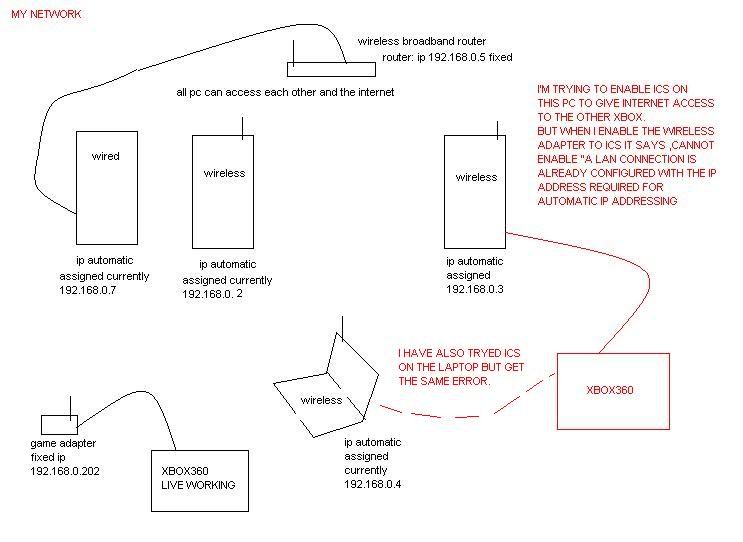
whats wrong with my setup? pics inside
-
leecavturbo
- New Member
- Posts: 7
- Joined: Sat Aug 19, 2006 6:17 pm
-
koldchillah

- Senior Member
- Posts: 4629
- Joined: Thu Apr 04, 2002 1:45 pm
- Location: Orlando
That error is trying to tell you that there is already a DHCP server on your network, probably your wireless router. ICS simply turns the host computer into a mini dhcp server which is how it shares out the internet to the ICS clients. More than one DHCP service on the network = conflict.
You basically need another wireless game adapter for the other XBOX, so that it can connect to the router on it's own.
You basically need another wireless game adapter for the other XBOX, so that it can connect to the router on it's own.
"Nobody's invincible, no plan is foolproof, We all must meet our moment of truth." - Guru
-
leecavturbo
- New Member
- Posts: 7
- Joined: Sat Aug 19, 2006 6:17 pm
-
koldchillah
- Senior Member
- Posts: 4629
- Joined: Thu Apr 04, 2002 1:45 pm
- Location: Orlando
Not sure but you could try it. I would imagine the Xbox connection going through a wireless ICS host will have some heavy latency, but as long as it's getting to the gateway, it might work. ::shrugs:: You would still be much better off getting another Xbox wireless adapter.. at least thats what I would do.leecavturbo wrote:so if i assign ip's for all pc's and router and gateway ip etc etc turning off dhcp on the router , i can have ics on 1 of the pc?
Good luck.

"Nobody's invincible, no plan is foolproof, We all must meet our moment of truth." - Guru
-
leecavturbo
- New Member
- Posts: 7
- Joined: Sat Aug 19, 2006 6:17 pm

-
koldchillah
- Senior Member
- Posts: 4629
- Joined: Thu Apr 04, 2002 1:45 pm
- Location: Orlando
Yeah, I didn't think that was going to work, but it was worth a shot.
Any chance of getting a cable run to either XBox so the one farthest away can use the wireless adapter? Buying a really long cable would be a lot cheaper than the adapter.
Other than that, I don't really know what to suggest for you. Sometimes you just have to bite the bullet and buy the things you need to do it right.
Any chance of getting a cable run to either XBox so the one farthest away can use the wireless adapter? Buying a really long cable would be a lot cheaper than the adapter.
Other than that, I don't really know what to suggest for you. Sometimes you just have to bite the bullet and buy the things you need to do it right.
"Nobody's invincible, no plan is foolproof, We all must meet our moment of truth." - Guru
-
randomousity
- Member
- Posts: 36
- Joined: Thu Aug 17, 2006 9:53 pm
- Location: Havana, Cuba
My quick guess
Here's my guess: your wireless router and ICS are both trying to use the same net, 192.168.0.x to assign IP addresses. You either need to subnet it, or change one of them to use a different network, perhaps 192.168.1.x. Unless you know how to subnet, just changing the network is probably easier.

If the PC with the wireless (that you are trying to connect the xbox to) has both wireless capability AND a wired network card, you could connect the xbox to that computer with a crossover cable, then bridge the wireless and wired networks on the PC. XP will act as a poor-man's router and allow communication between the two connections.
courtney
courtney
-
leecavturbo
- New Member
- Posts: 7
- Joined: Sat Aug 19, 2006 6:17 pm
thank you courtenay. worked straight away once i manually configured an ip address for the bridgeCourtney wrote:If the PC with the wireless (that you are trying to connect the xbox to) has both wireless capability AND a wired network card, you could connect the xbox to that computer with a crossover cable, then bridge the wireless and wired networks on the PC. XP will act as a poor-man's router and allow communication between the two connections.
courtney

-
leecavturbo
- New Member
- Posts: 7
- Joined: Sat Aug 19, 2006 6:17 pm
just to re-cap. now working.
all the above pc's where changed to manual ip addresses, then dhcp was disabled on the router, the pc that i wanted ics on ,now has a bridge between the wireless and the lan ports. the bridge it self was manually ip address'd and i had to tell both these connections the ip address of the router (gateway) and the dns which was also the same address as the router ip address.
all the above pc's where changed to manual ip addresses, then dhcp was disabled on the router, the pc that i wanted ics on ,now has a bridge between the wireless and the lan ports. the bridge it self was manually ip address'd and i had to tell both these connections the ip address of the router (gateway) and the dns which was also the same address as the router ip address.