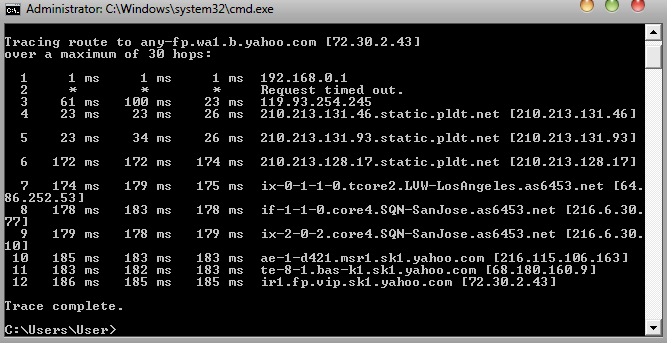
`my PLDT is so slow
`i need someone to help me out
PLDT Tweak (Vista)
-
Crew Master
- New Member
- Posts: 8
- Joined: Wed May 04, 2011 10:09 pm
« SpeedGuide.net TCP Analyzer Results »
Tested on: 05.04.2011 23:33
IP address: 112.210.xxx.xxx
Client OS: Windows Vista
TCP options string: 0204058601010402
MSS: 1414
MTU: 1454
TCP Window: 17520 (NOT multiple of MSS)
RWIN Scaling: 0 bits
Unscaled RWIN : 17520
Recommended RWINs: 65044, 130088, 260176, 520352, 1040704
BDP limit (200ms): 701kbps (88KBytes/s)
BDP limit (500ms): 280kbps (35KBytes/s)
MTU Discovery: ON
TTL: 41
Timestamps: OFF
SACKs: ON
IP ToS: 00000000 (0)
help :/
Tested on: 05.04.2011 23:33
IP address: 112.210.xxx.xxx
Client OS: Windows Vista
TCP options string: 0204058601010402
MSS: 1414
MTU: 1454
TCP Window: 17520 (NOT multiple of MSS)
RWIN Scaling: 0 bits
Unscaled RWIN : 17520
Recommended RWINs: 65044, 130088, 260176, 520352, 1040704
BDP limit (200ms): 701kbps (88KBytes/s)
BDP limit (500ms): 280kbps (35KBytes/s)
MTU Discovery: ON
TTL: 41
Timestamps: OFF
SACKs: ON
IP ToS: 00000000 (0)
help :/

-
Crew Master
- New Member
- Posts: 8
- Joined: Wed May 04, 2011 10:09 pm
Crew Master wrote:`thanks dude
`my download can only reach 50-40 kbps, do you have some idea on how speed it up?
:/
What speed package did you pay to get?
Test speed at a test sever in your country at http://www.speedtest.net and post the results.
"Contentment is not the fulfillment of what you want, but is the realisation of how much you already have" - anon
-
Crew Master
- New Member
- Posts: 8
- Joined: Wed May 04, 2011 10:09 pm
speed package?trogers wrote:What speed package did you pay to get?
Test speed at a test sever in your country at http://www.speedtest.net and post the results.
Speedtest result:

Crew Master wrote:speed package?
Speedtest result:
Ping time of 894ms suggests problem with signal quality.
Do a tracert to http://www.yahoo.com and post.
"Contentment is not the fulfillment of what you want, but is the realisation of how much you already have" - anon
-
Crew Master
- New Member
- Posts: 8
- Joined: Wed May 04, 2011 10:09 pm
how?trogers wrote:Ping time of 894ms suggests problem with signal quality.
Do a tracert to http://www.yahoo.com and post.
All Programs->Accessories->Command PromptCrew Master wrote:how?
In black box, enter the following:
C:\>tracert http://www.yahoo.com
"Contentment is not the fulfillment of what you want, but is the realisation of how much you already have" - anon
-
Crew Master
- New Member
- Posts: 8
- Joined: Wed May 04, 2011 10:09 pm
`here is the result:trogers wrote:All Programs->Accessories->Command Prompt
In black box, enter the following:
C:\>tracert http://www.yahoo.com
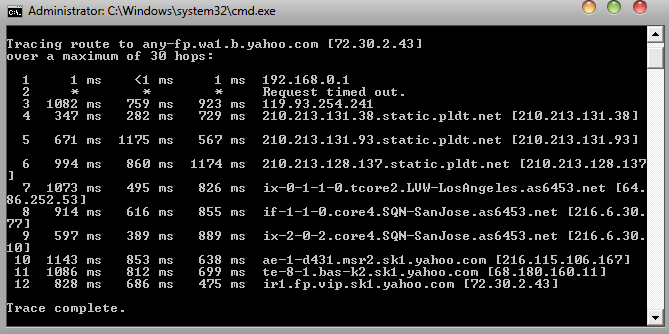
...really need ur help
Crew Master wrote:`here is the result:
...really need ur help
First thing to do is to turn off the modem and relocate it a few feet away from ALL other electrical devices. If there is no space on the comp table, place it on the floor below the comp table.
Also, make sure you do not coil up any signal or power cables.
Then post a new tracert.
"Contentment is not the fulfillment of what you want, but is the realisation of how much you already have" - anon